My current laptop is an aging X1 Carbon generation 7, purchased some time in mid
2019. A few months ago a few keys of the keyboard stopped working, specifically
the 5, 6, -, = and Delete keys. Sometimes I can get it working again by
mashing one of them for a while, but it's not consistent. Given my past
experiences with X1 Carbon laptops breaking outside of warranty and the
frustration that comes with replacing their components, I decided it was time to
look for a replacement.
Unfortunately, buying a new X1 Carbon wasn't going to be an option: when it comes to displays you now basically have two choices: a subpar not-quite-2K IPS display, or a 2.5K (ish) OLED display. Since I use my laptop for programming and often use it in low light conditions such as a living room with dimmed lights in the evening, OLED just doesn't make sense. Knowing my luck I'd also run into OLED burn-in the moment the warranty expires. There are also some other issues with the X1 line in general, such as poor CPU cooling and the absolute nightmare that is opening them up to replace parts or clean them properly.
I looked at some other brands but it appears that in 2025 there's just aren't many good options for Linux users. I narrowed it down to two options:
- Buy a refurbished M1 or M2 Macbook and run Asahi Linux
- Buy a Framework
I eliminated the use of Asahi Linux because of the following reasons:
- The battery life doesn't appear to be all that better than conventional laptops when running Linux. This isn't entirely surprising because of a lot of the battery improvements on macOS are the result of the software and hardware integration, not just the hardware
- There seem to be issues with suspend not working as well (at least based on various comments I came across), and hardware support in general is a bit dodgy
- If something needs replacing I basically have an expensive paperweight, because everything is soldered together, assuming you could even find spare parts in the first place
- I'm not sure Asahi as a project will still be around in 5 years, but my laptop will be
In contrast, Framework laptops has many supposed benefits: they're upgradable, repairable, actively work on Linux and even FreeBSD support (or at least sponsor developers working on this), allow you to customize the keyboard using QMK/VIAL. In fact, on paper it sounds like the perfect developer laptop. In reality, I'm not so sure.
Table of contents
- Configuration
- Building the laptop
- Operating system
- Weight
- Design
- Display
- Power LED
- GPU
- CPU
- Battery
- WiFi and Bluetooth
- Keyboard
- Trackpad
- Speakers
- Modular ports
- Conclusion
Configuration
Framework has three models of laptops: a 12 inch, 13.5 inch and 16 inch laptop. My X1 Carbon is a 14 inch laptop but I've always felt like I wanted something just slightly larger. I ended up buying the Framework 16 for two reason:
- I read various reports of the Framework 13 having issues with poor battery life, fan noise, heating, etc
- While 16 inch is a fair bit larger than 14 inch, I was hoping it would be manageable size wise
The base configuration is as follows:
- Framework 16 DIY edition
- CPU: Ryzen AI 7 350
- RAM: 2x8 GiB DDR5-5600
- SSD: WD Black SN7100, 500 GiB
I also bought an additional Intel AX210 WiFi card in case the default Mediatek card would cause any trouble, as I don't trust brands other than Intel when it comes to WiFi.
Shipping took about a week or so, with the laptop making quite the journey from Taiwan to the Philippines to China, then to Japan and then back to China, then to Istanbul, then to France and at last to The Netherlands. I'm not sure what happened here, maybe the pilot got drunk or perhaps Fedex' tracking is just broken.
Building the laptop
I bought the DIY edition which requires some manual assembly, though not nearly as much as I feared. All I had to do was install the SSD, RAM, and the keyboard spacers. The spacers, touchpad and keyboard use magnetic connectors so installing and removing them is trivial. To access the SSD and RAM slots you need to unscrew a plate that sits between these slots and the keyboard, but this only takes a few minutes using the provided screwdriver.
I didn't measure how long it took me to install it the first time, but opening it up and putting it back together a second time only took perhaps 5-10 minutes at most. For comparison, to replace most parts of the X1 Carbon you essentially have to take the whole thing apart and unscrew countless screws many of which are hard to find. Unsurprisingly, I've lost some of these screws over the years and dreaded opening it up the few times I had to.
This is an area where Framework excels compared to all other brands: it's just so easy to swap the parts out that it puts other brands to shame when it comes to hardware maintainability.
Operating system
For the operating system I initially gave FreeBSD 15 a quick try. I knew it wasn't going to be the final OS due to it still having issues with the Framework hardware (e.g. suspend doesn't work properly), but I figured it was worth a try just to see what would happen. The installation went fine and WiFi worked fine, though that was because I swapped the Mediatek card with the Intel AX210 as the Mediatek card doesn't work at all on FreeBSD. Upon loading the AMD drivers I encountered a kernel crash, likely due to the same issue as discussed in this drm-kmod issue. A laptop without working GPU drivers isn't going to work, so at this point I decided to give up on FreeBSD (again) and install Fedora 43 instead.
Fedora 43 worked just fine as expected, and everything worked, so let's take a look at the hardware.
Weight
The Framework 16 weights about 2.2 kg according to my kitchen scale. For comparison, my X1 Carbon weights 1.3 kg. That may not seem like a big difference, but the extra kilogram makes carrying around the Framework 16 more difficult. In particular, I don't feel comfortable carrying it with just one hand while this isn't a problem with the X1.
The Framework is best described as a bit of a chonker and I certainly don't see myself carrying it around a lot. This also gives it a bit of an identity crisis: laptops should be portable, otherwise why not just get a desktop. And yet the Framework 16 is neither portable nor remotely as powerful as a desktop, so who exactly is the target audience?
Design
The design of the laptop is a bit polarizing. I like the combination of black and silver, but I hate how janky it all looks and feels due to the removable spacers. Note the lines separating the touchpad from the spacers on the left and right of it:
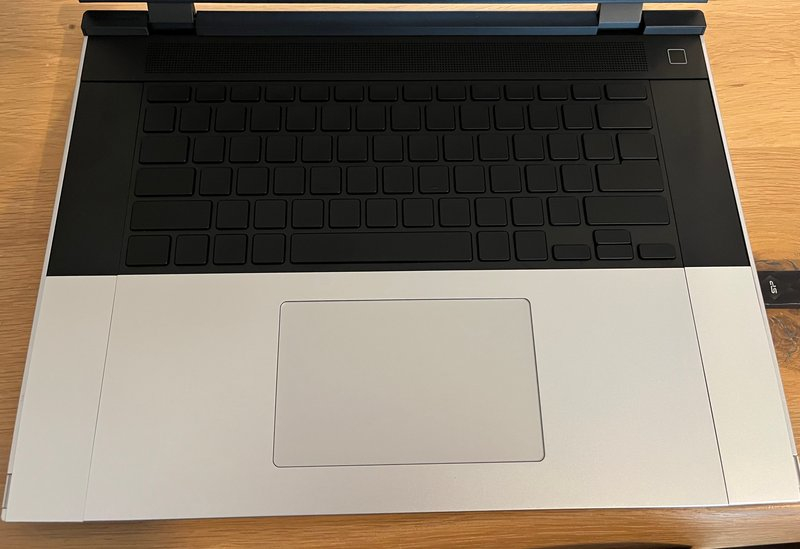
Not only does it look weird, you can also feel the gap and edges when resting your palm on them. The silver spacers and touchpad are also raised slightly relative to the black keyboard area, and the edges are quite sharp. If you have arm hairs you may consider shaving them off or risk getting them stuck. I also suspect gunk will build up in these edges over time.
The spacers aren't held solid in place either, meaning you can move them around and they have a bit of flex to them:
You may need to turn up your volume to hear the noise the spacers make. Also, apologies for the vertical video!
There's also a practical problem: due to the flex of the spacers if you try to hold the laptop on its sides it will actually "wobble" a bit. Combined with the weight I suspect that unless you hold on to this laptop for dear life, you will at some point drop it.
These issues could be considered a minor issue in isolation but remember, this model costs two thousand Euros (I'll bring this up a few more times). For a premium price I expect a premium design and build quality, and this isn't it.
Display
The display isn't terrible, but it's not great either. Like most laptop displays that aren't Macbooks there's a bit of flex to the display, though this shouldn't be much of an issue. The colors of the display are overly saturated, with reds in particular looking more intense than they should. Here's a silly example of what a particular shade of red looks like on my X1 Carbon:

And here's the same color on the Framework 16:

Note that both displays were using the same brightness and the same color temperature/night light setting. For comparison, here's what those colors should look like when using a properly calibrated (at the hardware level at least) Eizo CS2740 that I use for my desktop:

I'm aware the quality of the photos isn't great, but if you compare the Framework version to the others you'll notice the colors are more saturated compared to what they should look like.
The white/grey uniformity also leaves a lot to be desired, though this is true for all modern IPS displays that aren't manufactured by Eizo:
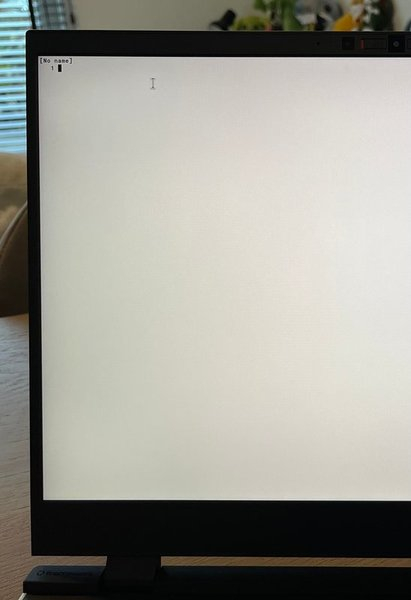
I find non-uniform displays distracting as it can create a sort of tunnel vision effect/feeling. While the X1 Carbon also suffers from this problem, it feels less pronounced than in case of the Framework. Of course the Eizo display doesn't suffer from this problem at all (hence I bought it), but then it again it costs a ridiculous €1700.
Which brings us to the brightness. This display is bright, even at the lowest setting. I found various forum posts that mention the Framework 13 suffers from a similar issue but that you can at least now lower the brightness further on recent versions of Linux, but this isn't supported for the Framework 16. Here's what that looks like in practice:
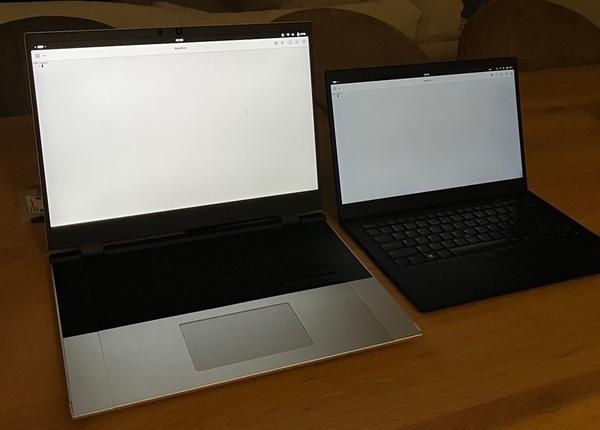
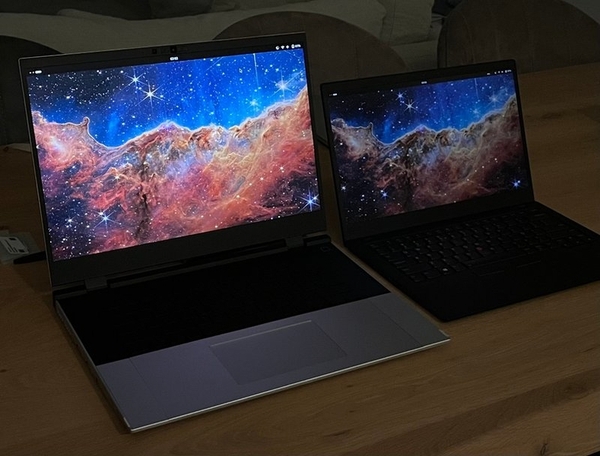
The Framework 16 is on the left and the X1 Carbon on the right, both set to the lowest brightness setting that is still usable.
The Framework 16 being so much brighter means that using it in a darker room (e.g. a living room at night with the lights dimmed) makes you feel like a deer looking into the headlights of a car that's about to run you over. In other words, not fun.
Power LED
On the topic of brightness, the power button in the top right corner of the keyboard has an LED that can't be turned off in the BIOS. Instead, you can set it to a few different settings including "Ultra low", but it doesn't make much of a difference as even at the lowest setting it's still too bright. This wouldn't be so bad if it wasn't sitting in the bottom right corner of your eye when you look at the display.
I ended up using this systemd service to turn the LED off upon booting, but something as simple as this should just be a BIOS option. Not being able to turn the LED off is apparently a feature.
GPU
I didn't do any GPU intensive testing such as video decoding. One annoying issue is that the display has a tendency to flicker. On top of that, there's a "nice" feature where the GPU reduces the display brightness based on the contents on the screen to conserve battery. The problem is that it takes a good two seconds or so to adjust, making it obvious and jarring to look at. It's especially noticeable when switching to the workspace overview in Gnome and back, due to a large section of this overview being a dark color.
This feature is disabled by adding amdgpu.abmlevel=0 to GRUB_CMDLINE_LINUX
in /etc/default/grubg, followed by running sudo grub2-mkconfig -o
/boot/grub2/grub.cfg and a reboot. This also seems to reduce the amount of
flickering, though it still happened a few times after applying this setting.
Some additional details on the ambient dimming anti-feature are in this forum post.
I can see the value of this feature but only if the GPU waits longer before adjusting the brightness and increases the transition time so it's less obvious. In it's current form it's just a nuisance.
CPU
The CPU is fine, though I didn't extensively test its performance. It's certainly better than the mediocre Intel CPU of my X1 Carbon. One thing I noticed is that the CPU makes a sort of coil whine/crackling BZZZZZZ noise when under load. This isn't unique to Framework (e.g. my X1 also does this), the more open design (e.g. there's a big fan grill/mesh at the top of the keyboard) makes this more noticeable.
I can't speak about the fan noise because I never heard them. This could either mean they are quiet enough or that I didn't stress the CPU enough.
Battery
I didn't do any proper testing of battery usage, but it seems to be on par with other Linux capable laptops based on my usage thus far. This means you'll likely be looking at 6-8 hours of battery per charge for average programming usage. It seems this is the case for basically any reasonable Linux-capable laptop these days, unfortunately.
I did notice that it drains quite a bit when suspended: when I put it to sleep the first night the battery was at 47%. When I opened the laptop again some 8 hours later the battery was at 42%. This means you're looking at about 5% of battery per average night, which isn't great. Hibernate could be an alternative but support for it on Fedora is a bit dodgy and requires some manual work I'm not interested in, so I didn't test this.
WiFi and Bluetooth
Both the Intel and Mediatek cards work without issue. Both achieve the same speeds on my 1 Gbps connection over a 5Ghz network (with a channel width of 80mhz): about 800-900 Mbps for uploads and somewhere between 600 and 700 Mbps for downloads. While not being able to achieve the full 1 Gbps speed over WiFi is expected, I was a bit surprised to see that uploads are in fact faster than downloads.
I tested various other devices with similar WiFi hardware and they all upload and download at about the same speeds, and all operate at slightly lower speeds (500-600 Mbps, depending on your luck).
I don't think it's the network itself either: the access points are TP-Link EAP660 HDs that can handle speeds well beyond 1 Gbps. As far as I know the configuration is also sound (including the use of specific channels to reduce interference to a minimum).
Still, 600-700 Mbps over WiFi is more than I'll probably ever need so I didn't dive into this further.
I didn't specifically test Bluetooth but it did detect a few devices, so I'll assume this will work just fine.
Keyboard
Some reviews I read mentioned that the keyboard has a bit of flex to it, but I didn't notice this. The keycaps are a little mushy, which isn't too bad but not great either. The difference in key size and spacing compared to the X1 did mean I pressed the wrong key at times, but I suspect this is just a matter of adjusting.
The keyboard runs QMK, albeit a rather outdated version of QMK released in 2022. I experimented with porting the code to a newer version so I could take advantage of some features that I use in my split keyboard, but couldn't get it to work. The official way to configure the keyboard is by using this VIAL web application. This application requires WebHID support which isn't implemented by Firefox, requiring me to install and use Chromium just to configure the keyboard. This isn't enough though, as on Linux you'll need to install some additional udev rules to get things working. The official rules provided by QMK didn't work, instead I used the rules from this forum reply.
Once set up I was able to configure the keyboard such as by changing the layout from QWERTY to Colemak-DH. VIAL is pretty basic though and the interface is rather clunky, so I'm not a fan of this approach. I hope that at some point Framework will upstream their keyboard logic into the official QMK repository to make this process easier.
Trackpad
The trackpad is decent, though I noticed it's overly sensitive when it comes to scrolling. For example, on various occasions I lifted my fingers off the trackpad without any swiping motion and somehow still managed to trigger a scrolling motion. The trackpad of the X1 Carbon doesn't have this problem and subsequently is easier and more pleasant to use.
Speakers
They're terribly. Or more precisely, they're terrible when the volume is less than 50% or so. What appears to be happening is that adjusting the volume below 50% doesn't result in it being louder but instead changes how it sounds (for a lack of a better description). At lower volumes it sounds like sound playing over a phone in speaker mode, with a sort of tin can/metallic sound to it. Once you hit 50% or so it starts to sound more like an OK set of speakers but it also becomes noticeable louder. There's a setting in the BIOS that you can set to "Linux" mode to supposedly improve the quality but it was already set to this value.
While most laptop speakers aren't great (even the Dolby Atmos speakers of the X1 Carbon are mediocre), for a laptop that costs two thousand Euros the sound is disappointing.
Modular ports
An interesting feature of the Framework is that you can swap out the various ports. You want 6 USB-C ports? You can do that! What about 3 headphone jacks? Also possible! Replacing them is quite easy, though for some reason my headphone jack adapter required some additional force to be removed.
Like the keyboard area the design is a bit janky though, with visible lines/space between the adapters and the case, though this at least is something you won't notice unless you're explicitly looking for it.
Conclusion
Which brings me to the conclusion: is it worth buying this laptop, considering most configurations will cost you around two thousand Euros? To be honest, no, not at all. For a premium price I expect a premium laptop, but the Framework 16 feels more like a €1200-€1500 laptop at best and certainly doesn't deliver a premium experience. I understand Framework is a young company still trying to figure out a lot of things, but two thousand Euros for this kind of laptop is just absurd.
For this reason I've submitted a request to return the laptop. What I'll be replacing my X1 Carbon with instead I'm not entirely sure of. One option is the Framework 13 given that it solves at least some issues I have with the Framework 16 (e.g. it's bulkiness and inability to lower the brightness further), but it also seems to share many of the other issues such as poor speaker quality and (at least from hat I could find) worse heat regulation, and a (possibly) worse battery.
I've looked at various other brands such as System76 and the many other Clevo resellers, but they all seem to suffer similar issues such as poor battery life, poor performance, difficult to maintain hardware wise, or some combination thereof.
I guess for now the X1 Carbon will have to hold out a little longer, provided I don't throw it out of the window the next time I can't get the various dodgy keyboard keys to work.